
Case Study 1: Strings Visualization
I was part of an in-house localization team at a gaming company, tasked with translating a major MMORPG. The game featured deep, complex mechanics, including a fully fleshed-out Trading Card Game (TCG) system. Our team worked primarily in a browser-based CAT tool.
While the project was highly recognizable and exciting to work on, its underlying string architecture created a massive bottleneck for our linguists. The game engine relied heavily on dynamic text injection, meaning translators rarely worked with clean, plain sentences.
Strings were messy
The localization files contained a dense web of variables, tags, and conditional formatting. A single string could contain markers for special in-game UI icons, text coloring, or the dynamic insertion of item names, skill effects, and damage calculations.
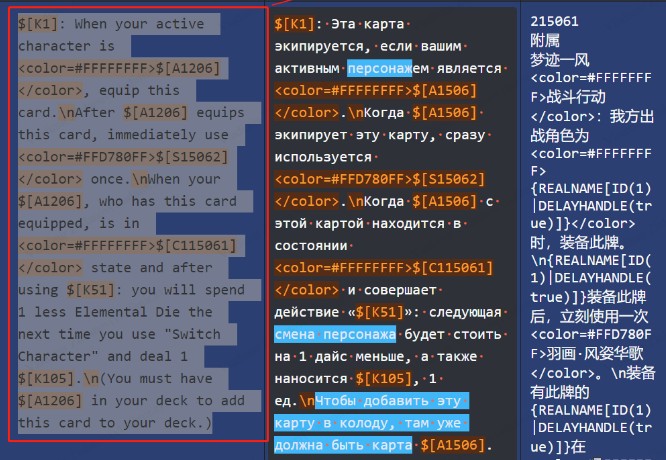
This caused three critical issues on the production floor:
- Cognitive Overload: It was nearly impossible to understand the final context or flow of a sentence until it was fully rendered in the game client. Translators were essentially translating blind.
- Technical Fragility: A single typo, missing bracket, or accidental deletion of a variable tag would cause rendering crashes or broken UI elements in the live game engine.
- Severe Inefficiency: Linguists had to mentally parse heavy, ugly markup just to translate the actual text, drastically slowing down our daily output.
Ad-hoc solution
I realized we didn't need to wait for the developers to change the game engine; we needed a bridge inside our own workspace. I built a custom browser extension that integrated directly with our CAT tool.
With a single click, the plugin parsed the raw string using a set of regular expressions. It cross-referenced internal tags against an easily updatable CSV file containing all current in-game terms and icon URLs, and instantly generated a rich-text preview directly in the editor.
Tag Rendering Preview: Complex internal tags are instantly swapped for recognizable visual icons and formatted text.

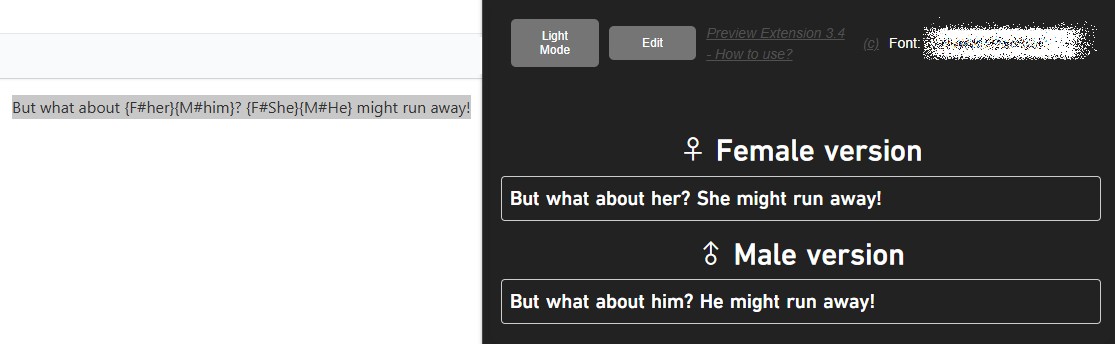
The game also featured extensive branching dialogue and gender-specific grammar. The plugin was designed to handle these edge cases gracefully, ensuring translators could see exactly how a string would adapt based on the player's selected character.
Gender Markup Handling: Side-by-side verification of male/female string variations.
How it was built
Engineering Approach: While I had a programming experience in other languages, I had never built a Chrome extension before. The problem and the goal were perfectly clear, so I used an AI coding assistant to accelerate the boilerplate and help with unfamiliar DOM manipulation syntax.
However, AI was strictly a helper, not the architect. I maintained full control over the logic, designed the regex parsing strategy, and debugged the edge cases myself. It was a great opportunity to actively learn the Chrome API while delivering immediate business value.
Crucially, I designed the tool to be extremely lightweight with zero external dependencies. There were no heavy frameworks or complex build pipelines. This made it highly secure, trivial to maintain, and incredibly easy for other studio teams to fork, adapt, and deploy for their own projects without worrying about dependency bloat.
Result & Impact
What used to be one of the most frustrating and time-consuming tasks on the project became trivial. The visual feedback loop allowed translators to catch errors before they ever reached the QA team. Because the codebase was so clean and dependency-free, colleagues quickly adopted and expanded the plugin for other studio titles with similar string mechanics.
Impact Metrics:
- Translation Speed: Processing time for highly complex, variable-heavy strings increased almost 2x due to instant visual context.
- Error Rate (LQA): Prevented tag-breaking typos. Rendering bugs and incorrect translations during Linguistic QA dropped from 5% to near 0%.